

- 23 Jul, 2025
- design-thinking
- ux-design
- saas
- web-development
- product-management
- By Sergii
Design Thinking Ultimate Guide for Web Developers
In the fast-paced world of web development and SaaS applications, creating products that truly resonate with users is both an art and a science. Design Thinking provides a structured, human-centered approach that empowers development teams to build digital products that solve real problems and deliver exceptional user experiences.
What is Design Thinking?
Design Thinking is an iterative, empathy-driven methodology that puts users at the center of the product development process. Unlike traditional development approaches that might prioritize technical feasibility first, Design Thinking starts with understanding human needs and behaviors, then works backward to create solutions.
For web developers and SaaS teams, this methodology transforms how we approach feature development, user interface design, and product strategy. It’s particularly powerful in the digital space where user expectations are constantly evolving and competition is fierce.
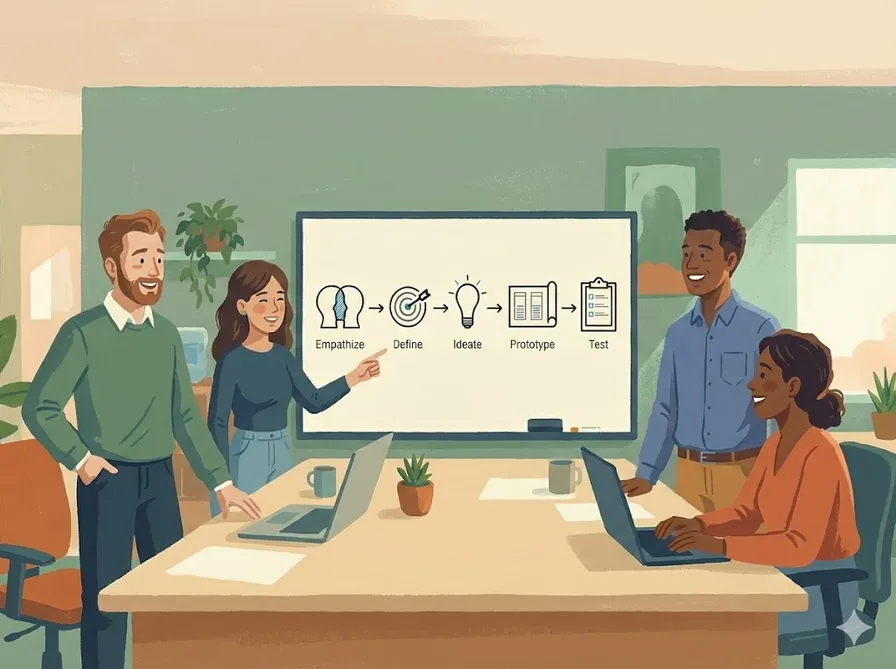
The Five Phases of Design Thinking
1. Empathize: Understanding Your Users
The foundation of successful web applications and SaaS products is deep user understanding. This phase involves immersing yourself in your users’ world to uncover their pain points, motivations, and behaviors.
For Web Developers:
- Conduct user interviews with actual website visitors
- Analyze user behavior through heatmaps and analytics
- Shadow users as they navigate your current application
- Study support tickets and user feedback
SaaS-Specific Techniques:
- Monitor user onboarding flows and identify drop-off points
- Analyze feature usage patterns and user journeys
- Interview churned customers to understand why they left
- Observe users during trial periods
Example: A SaaS team developing a project management tool discovered through user interviews that small business owners felt overwhelmed by complex features. They weren’t looking for enterprise-level functionality—they needed simple task tracking that didn’t require extensive setup.
2. Define: Frame the Problem
With user insights in hand, the Define phase crystallizes the problem you’re solving. This isn’t about feature specifications—it’s about articulating the human challenge your digital product will address.
Creating Problem Statements:
- Use the format: “How might we help [user persona] achieve [goal] when [context/constraint]?”
- Focus on user outcomes, not technical solutions
- Ensure the problem is specific and actionable
Web Development Example: Instead of “Users need a better search function,” frame it as “How might we help busy e-commerce shoppers find specific products quickly when they have limited time and know exactly what they want?”
SaaS Example: Rather than “We need better reporting,” define it as “How might we help marketing managers demonstrate ROI to stakeholders when they’re under pressure to justify budget allocations?“
3. Ideate: Generate Creative Solutions
The Ideation phase unleashes creativity while maintaining user focus. This is where technical expertise meets user insights to generate innovative solutions.
Ideation Techniques for Development Teams:
- Crazy 8s: Sketch 8 different solutions in 8 minutes
- How Might We: Transform problems into opportunities
- User Story Mapping: Visualize user journeys and identify solution points
- Technical Constraint Brainstorming: Generate ideas within specific technical limitations
Web Development Focus:
- Consider mobile-first solutions
- Think about progressive web app capabilities
- Explore API integrations and third-party services
- Evaluate performance implications of different approaches
SaaS Considerations:
- Multi-tenant architecture implications
- Scalability requirements
- Integration with existing user workflows
- Data security and compliance needs
4. Prototype: Build to Learn
Prototyping in the digital space allows rapid experimentation without extensive development overhead. The goal is to test assumptions quickly and cheaply.
Prototyping Levels:
- Paper Sketches: Quick layout exploration
- Wireframes: Structure without visual design
- Interactive Mockups: Click-through experiences using tools like Figma or InVision
- HTML/CSS Prototypes: Functional experiences with real code
- MVP Features: Minimal viable implementations for real user testing
Web Development Prototyping:
- Create interactive search functionality with real-time suggestions
- Implement autocomplete features that respond to user input
- Use event listeners to capture user interactions
- Fetch and display suggestions based on query parameters
- Test different threshold values for when suggestions appear
SaaS Prototyping Strategies:
- Create feature flags to test new functionality with select users
- Build isolated micro-features that can be easily removed
- Use A/B testing frameworks to compare different approaches
- Implement analytics to measure prototype performance
5. Test: Validate with Real Users
Testing transforms assumptions into data-driven insights. In the digital realm, testing can happen continuously and at scale.
Testing Methods:
- Usability Testing: Watch users interact with your prototype
- A/B Testing: Compare different versions with real traffic
- Analytics Analysis: Measure user behavior patterns
- Feedback Collection: Gather qualitative insights through surveys and interviews
Web Development Testing:
- Cross-browser compatibility testing
- Mobile responsiveness validation
- Performance testing under various network conditions
- Accessibility compliance verification
SaaS Testing Considerations:
- Feature adoption rates
- User engagement metrics
- Conversion funnel analysis
- Customer satisfaction scores (NPS, CSAT)
Popular Design Thinking Frameworks for Digital Products
The Lean UX Framework
Lean UX adapts Design Thinking principles for agile development environments, making it perfect for web and SaaS teams.
Core Principles:
- Cross-functional Collaboration: Designers, developers, and product managers work together throughout the process
- Rapid Experimentation: Build-measure-learn cycles with quick iterations
- Continuous Learning: User feedback drives ongoing improvements
Implementation Example: A SaaS team building a customer support tool uses Lean UX by:
- Creating weekly sprint cycles that include user research, prototyping, and testing
- Building minimal feature implementations that can be rapidly modified
- Gathering user feedback through in-app surveys and usage analytics
- Iterating based on data rather than assumptions
The Double Diamond Framework
The Double Diamond provides structure for both problem exploration and solution development.
Diamond 1: Discovery
- Discover: Broad user research and market analysis
- Define: Narrow focus to specific problems worth solving
Diamond 2: Delivery
- Develop: Generate and test multiple solution approaches
- Deliver: Implement and launch the validated solution
SaaS Application: A team developing a marketing automation platform might:
- Discover: Interview 50+ marketers across different industries
- Define: Focus on email campaign personalization challenges
- Develop: Prototype three different personalization approaches
- Deliver: Launch the most successful prototype as a full feature
Design Thinking in Action: Real Examples
Example 1: E-commerce Search Optimization
Challenge: Users were abandoning searches on an e-commerce site.
Empathize: User interviews revealed that people often searched with vague terms and felt frustrated when results didn’t match their intent.
Define: “How might we help shoppers find products when they can’t articulate exactly what they want?”
Ideate: The team brainstormed visual search, category suggestions, and guided search flows.
Prototype: They built a quick prototype with category filters that appeared after initial search results.
Test: A/B testing showed 35% improvement in search-to-purchase conversion.
Example 2: SaaS Onboarding Redesign
Challenge: A project management SaaS had high trial-to-paid conversion issues.
Empathize: User research showed that new users felt overwhelmed by setup requirements and abandoned during onboarding.
Define: “How might we help new users experience value quickly without extensive setup?”
Ideate: Solutions included pre-built templates, guided tours, and progressive disclosure.
Prototype: The team created an interactive prototype with project templates and a simplified initial setup.
Test: User testing revealed the template approach resonated most strongly, leading to a 60% improvement in trial conversions.
Implementing Design Thinking in Your Development Process
Building User-Centered Development Habits
- Start Every Feature with User Research: Before writing code, understand the problem from the user’s perspective
- Create User Personas: Develop detailed profiles of your target users to guide decision-making
- Map User Journeys: Visualize how users interact with your product over time
- Establish Feedback Loops: Build mechanisms for continuous user input
Technical Implementation Strategies
For Web Developers:
- Implement analytics and user tracking early
- Use feature flags to test new functionality
- Build reusable component libraries that can be quickly recombined
- Prioritize performance and accessibility from the start
For SaaS Teams:
- Design with multi-tenancy in mind
- Build robust API foundations for future integrations
- Implement comprehensive logging for user behavior analysis
- Plan for scalability from early prototypes
Measuring Success
Design Thinking success in digital products can be measured through:
- User Engagement Metrics: Time on site, feature adoption, user retention
- Business Metrics: Conversion rates, revenue per user, customer lifetime value
- User Satisfaction: NPS scores, support ticket reduction, user feedback sentiment
- Development Efficiency: Reduced development time, fewer post-launch fixes
Common Pitfalls and How to Avoid Them
1. Skipping the Empathize Phase
Many development teams rush to solutions without adequate user research. This leads to features that seem logical but don’t address real user needs.
Solution: Dedicate time to user research before any development work begins.
2. Falling in Love with Your First Idea
Technical teams often get attached to elegant solutions, even when user testing suggests they’re not effective.
Solution: Embrace rapid prototyping and be willing to pivot based on user feedback.
3. Prototyping Too Much Detail Too Early
Over-investing in high-fidelity prototypes before validating core concepts wastes time and creates resistance to change.
Solution: Start with low-fidelity prototypes and increase detail only after validating core assumptions.
4. Testing with Internal Users Only
Development teams often test with colleagues or stakeholders rather than actual users.
Solution: Always include real users in your testing process, even if it requires additional effort to recruit them.
Tools and Resources for Design Thinking
Research and Empathy Tools
- User Interviews: Calendly, Zoom, Loom for recording sessions
- Analytics: Google Analytics, Mixpanel, Amplitude
- Feedback Collection: Hotjar, FullStory, UserVoice
- Survey Tools: Typeform, SurveyMonkey, Google Forms
Ideation and Collaboration
- Digital Whiteboards: Miro, Mural, FigJam
- Mind Mapping: XMind, MindMeister
- Collaborative Design: Figma, Sketch, Adobe XD
Prototyping and Testing
- No-Code Prototyping: Figma, InVision, Marvel
- Code-Based Prototyping: CodePen, JSFiddle, Vercel
- A/B Testing: Optimizely, VWO, Google Optimize
- User Testing: UserTesting.com, Maze, Lookback
The Future of Design Thinking in Digital Products
As web technologies and SaaS platforms continue to evolve, Design Thinking becomes even more critical. Emerging technologies like AI, voice interfaces, and AR/VR require even deeper user understanding to implement effectively.
Key Trends:
- AI-Augmented Research: Using machine learning to analyze user behavior patterns
- Continuous User Testing: Automated testing systems that provide ongoing user insights
- Cross-Platform Thinking: Designing experiences that work across web, mobile, and emerging platforms
- Ethical Design: Considering the broader impact of digital products on users and society
Conclusion
Design Thinking transforms web development and SaaS creation from a technology-first to a human-first discipline. By consistently applying these principles—empathizing with users, defining clear problems, ideating creative solutions, prototyping rapidly, and testing continuously—development teams can create digital products that truly serve their users’ needs.
The methodology isn’t just about better user interfaces; it’s about building products that solve real problems, create genuine value, and establish lasting relationships with users. In an increasingly competitive digital landscape, Design Thinking provides the framework for creating products that don’t just function well technically, but succeed in the marketplace by addressing authentic human needs.
Remember, Design Thinking is iterative. Each cycle through the process deepens your understanding and improves your solutions. Start small, measure results, and continuously refine your approach. Your users—and your business metrics—will thank you.